

Description
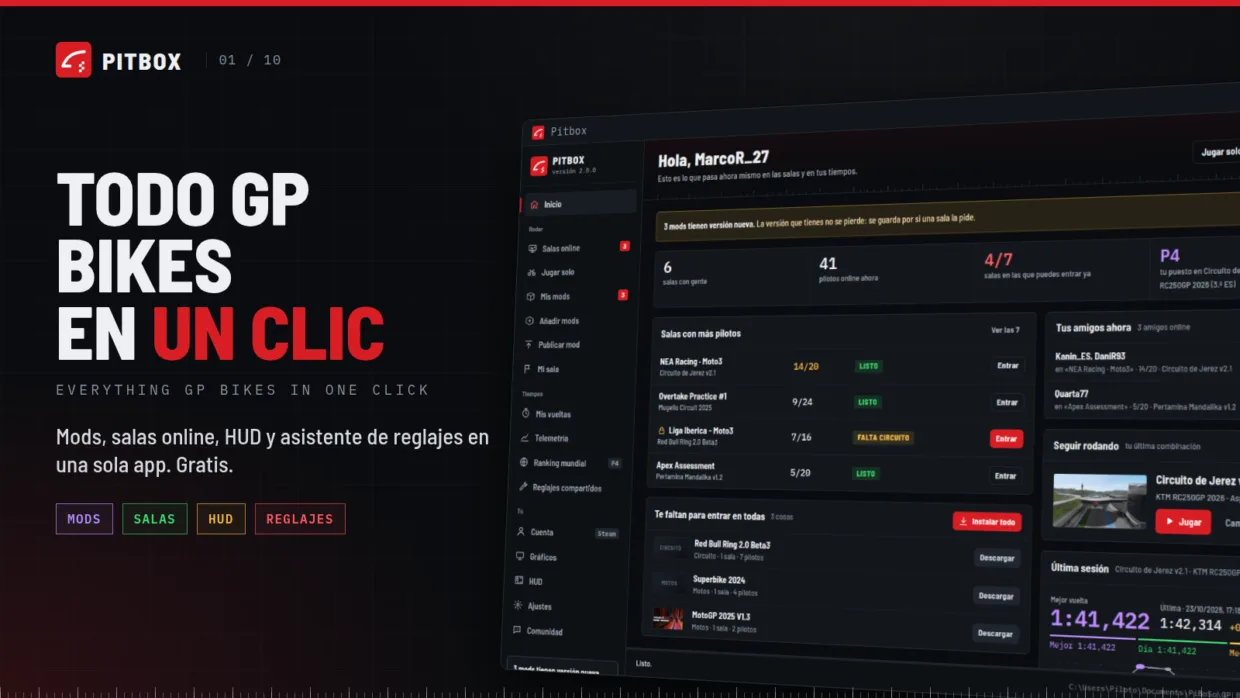
Pitbox is a free, all-in-one launcher for GP Bikes. Unofficial: not affiliated with PiBoSo or gpb-mods.com.
LAUNCHER
- Online rooms: see who is racing and join with one click. Missing tracks and bikes are installed for you.
- Play solo: a private testing session on your PC, with your bike, paints, riding style and weather.
- My room: host your own server step by step (track, bikes, sessions, weather, password) and invite friends.
- Add mods by category (tracks, bikes, riders, sounds, helmets, bike/helmet/suit paints) with automatic backups.
- My mods: see what you have installed, how much space it takes, and delete what you don’t use.
- Graphics profiles and settings in one place.
IN-GAME
- Setup assistant (F8): edit any bike’s setup, including tyre pressures, and get recommendations based on your telemetry, applied one at a time.
- HUD (F6 / Ctrl+F6): live delta to your best lap, track map with every rider, standings with OUT/PIT, sectors, lean angle, brakes and more. Move and resize everything with the mouse.
TELEMETRY & RANKING
- Per-lap telemetry: suspension, tyres, engine and more, with lap comparison.
- World ranking (Steam login), split by weather: dry and wet records are separate.
- Compare your laps with the best riders in the ranking.
Pitbox updates itself, and every update is signed. Available in 43 languages.
Mod Instructions
Windows:1. Unzip the Pitbox folder anywhere (NOT inside the GP Bikes folder).
2. Run Pitbox. A desktop shortcut is created the first time.
3. If Windows SmartScreen warns you, click "More info" -> "Run anyway" (the app is not signed yet).
4. Pitbox finds GP Bikes by itself. The setup assistant and HUD are installed from Settings.
Pitbox updates itself; you don't need to download it again.
Linux (Steam + Proton): download Pitbox-Linux.tar.gz from
https://github.com/cristianboni22/pitbox/releases/latest
Downloads
Total downloads: 3
